Claude Code 三色硬件状态灯太麻烦?教你用星际/魔兽语音或RGB 键盘零成本整活
今天刷抖音看到一个给claude code 加 物理的三色状态灯的视频感觉挺好玩,就简单搜索了一下
大佬们都是用物理外挂,不是Arduino 就是树莓派做三色灯,原理就是各种hook。
所以我做了一个更好玩的,直接个根据状态播放语音
 "hooks": {
    "SessionStart": [
      {
        "hooks": [
          {
            "type": "command",
            "shell": "powershell",
            "command": "(New-Object System.Media.SoundPlayer 'D:/sounds/ready.wav').PlaySync()"
          }
        ]
      }
    ],
    "UserPromptSubmit": [
      {
        "hooks": [
          {
            "type": "command",
            "shell": "powershell",
            "command": "(New-Object System.Media.SoundPlayer 'D:/sounds/shake-it-baby.wav').PlaySync()"
          }
        ]
      }
    ],
    "PermissionRequest": [
      {
        "matcher": "Read|Glob|Grep|WebFetch|WebSearch",
        "hooks": [
          {
            "type": "command",
            "shell": "powershell",
            "command": "(New-Object System.Media.SoundPlayer 'D:/sounds/on-hold.wav').PlaySync()"
          }
        ]
      },
      {
		"matcher": "Bash|Write|Edit",
        "hooks": [
          {
            "type": "command",
            "shell": "powershell",
            "command": "(New-Object System.Media.SoundPlayer 'D:/sounds/nuclear-launch-detected.wav').PlaySync()"
          }
        ]
      }
    ],
    "SessionEnd": [
      {
        "hooks": [
          {
            "type": "command",
            "shell": "powershell",
            "command": "(New-Object System.Media.SoundPlayer 'D:/sounds/bc-terminated.wav').PlaySync()"
          }
        ]
      }
    ],
    "TaskCompleted": [
      {
        "hooks": [
          {
            "type": "command",
            "shell": "powershell",
            "command": "(New-Object System.Media.SoundPlayer 'D:/sounds/job-s-finished.wav').PlaySync()"
          }
        ]
      }
    ],
    "TaskCreated": [
      {
        "hooks": [
          {
            "type": "command",
            "shell": "powershell",
            "command": "(New-Object System.Media.SoundPlayer 'D:/sounds/new-mission.wav').PlaySync()"
          }
        ]
      }
    ],
    "Stop": [
      {
        "hooks": [
          {
            "type": "command",
            "shell": "powershell",
            "command": "(New-Object System.Media.SoundPlayer 'D:/sounds/in-the-pipe-five-by-five.wav').PlaySync()"
          }
        ]
      }
    ],
    "PostToolUseFailure": [
      {
        "hooks": [
          {
            "type": "command",
            "shell": "powershell",
            "command": "(New-Object System.Media.SoundPlayer 'D:/sounds/TrollbatriderAngry4.wav').PlaySync()"
          }
        ]
      }
    ]
  }
几个事件是
SessionStart:进入claude code
UserPromptSubmit:就是输入完prompt 点击回车
PermissionRequest:要确认权限,可以根据不同的权限过滤,还有个PermissionDenied,我没写
SessionEnd:就是/exit 推出,如果在对话中resume会触发 SessionEnd再SessionStart
TaskCreated:任务列表创建
TaskCompleted:这个是有任务列表的时候所有任务完成,
Stop:单独对话的回复完成,这个回合TaskCompleted同时触发,比如任务列表完成了,然后对话结束,这两个都会有
我这几个语音都是 星际1的语音,用起来相当爽,跟打星际一样。你也可以换成魔兽3的比如:苦工,农民,侍僧的应该也挺好玩。比如: Yes,master ,The damned stand ready ,What must I do 之类的,war3的语音比星际多多了。
最后说下其实你有个rgb键盘就不需要外接物理设备了,直接
OpenRGB.exe -c FFFF00这样调用键盘灯就行,比外接一个指示灯强多了,而且还酷炫。
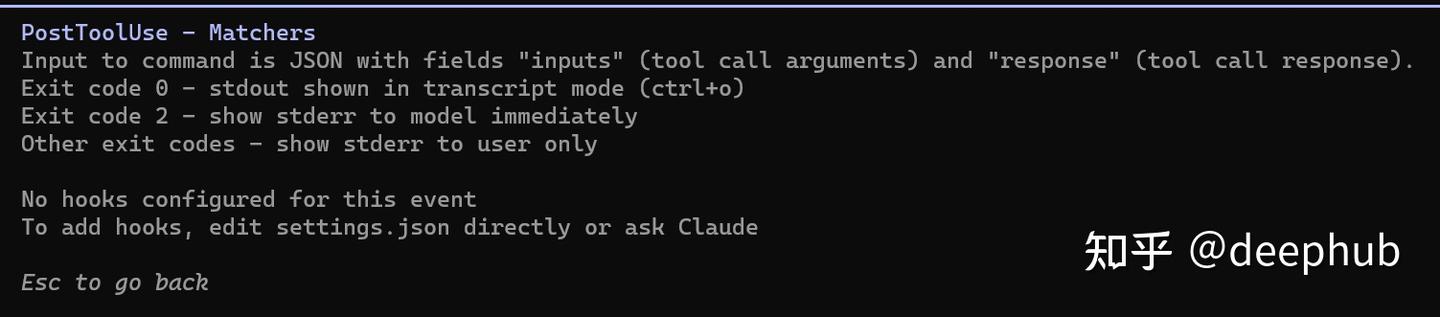
不过claude code是真懒,用/hook命令他直接告诉你,要么自己改要么问claude,这就是让你多花token。
2026.06.01我又看了一下完整的文档,这回应该时全的了
编辑于 2026-06-01 · 著作权归作者所有