高分屏浏览器,你用什么字体浏览网页最舒服?
Windows平台的网页字体向来是老大难问题,一方面是微软确实不讲究,对低分屏适配的一团糟,另一方面微软雅黑也确实过于老旧了,相比MacOS+苹方+定制屏幕的效果确实逊色不少。虽然现在浏览器基本上都搭载Noto Sans,但默认情况下显示效果偏细,阅读起来比较费劲。
虽然Greasy Fork上不乏字体美化脚本,但有的强制应用字体导致公式代码破碎,有的高度自定义但对网页性能开支较大。实际上大部分人只需要把网页字体平滑加粗一些,如果因此拖慢网页不免得不偿失。
笔者索性写了一个简单的平滑加粗脚本,采用纯CSS逻辑,在提升网页显示效果的情况下几乎不损失性能。
// ==UserScript==
// @name         浏览器字体渲染
// @namespace    fontrenderning.script.cmos4k
// @version      1.3.1
// @description  解决Windows平台浏览器默认情况下字体渲染偏细的问题。适用于Edge、Chrome、Firefox等。
// @author       太极
// @match        *://*/*
// @grant        GM_addStyle
// @run-at       document-start
// @license MIT
// @downloadURL https://update.greasyfork.org/scripts/562740/%E6%B5%8F%E8%A7%88%E5%99%A8%E5%AD%97%E4%BD%93%E6%B8%B2%E6%9F%93.user.js
// @updateURL https://update.greasyfork.org/scripts/562740/%E6%B5%8F%E8%A7%88%E5%99%A8%E5%AD%97%E4%BD%93%E6%B8%B2%E6%9F%93.meta.js
// ==/UserScript==

(function() {
    'use strict';

    // --- 配置区域 ---
    const config = {
        shadowSize: '0.75px',
        shadowColor: '#7C7C7CDD',
        strokeSize: '0px',
        strokeColor: 'transparent'
    };

    // --- 排除列表 ---
    const excludeSelectors = [
        'i', '[class*="glyph"]', '[class*="icon"]', '[class*="fa-"]', '[class*="vjs-"]',
        '[class*="watermark"]', '.textLayer *', 'pre', 'pre *', 'code', 'code *',
        '.mjx-container *', '.katex *'
    ].join(',');

    // --- 生成 CSS ---
    const css = `
        /* 1. 全局抗锯齿 */
        html {
            -webkit-font-smoothing: antialiased !important;
            -moz-osx-font-smoothing: grayscale !important;
            text-rendering: optimizeLegibility !important;
            -webkit-text-size-adjust: 100% !important;
        }

        /* 2. 核心渲染 */
        body, * {
            text-shadow: 0 0 ${config.shadowSize} ${config.shadowColor};
            -webkit-text-stroke: ${config.strokeSize} ${config.strokeColor};
        }

        /* 3. 排除项 */
        ${excludeSelectors} {
            text-shadow: none !important;
            -webkit-text-stroke: 0px transparent !important;
        }

        /* 4. 选中样式修复 */
        ::selection {
            background: Highlight !important;
            color: HighlightText !important;
            text-shadow: none !important;
            -webkit-text-stroke: 0px transparent !important;
        }
    `;

    // --- 注入样式 ---
    if (typeof GM_addStyle !== "undefined") {
        GM_addStyle(css);
    } else {
        const style = document.createElement('style');
        style.textContent = css;
        (document.head || document.documentElement).appendChild(style);
    }

})();
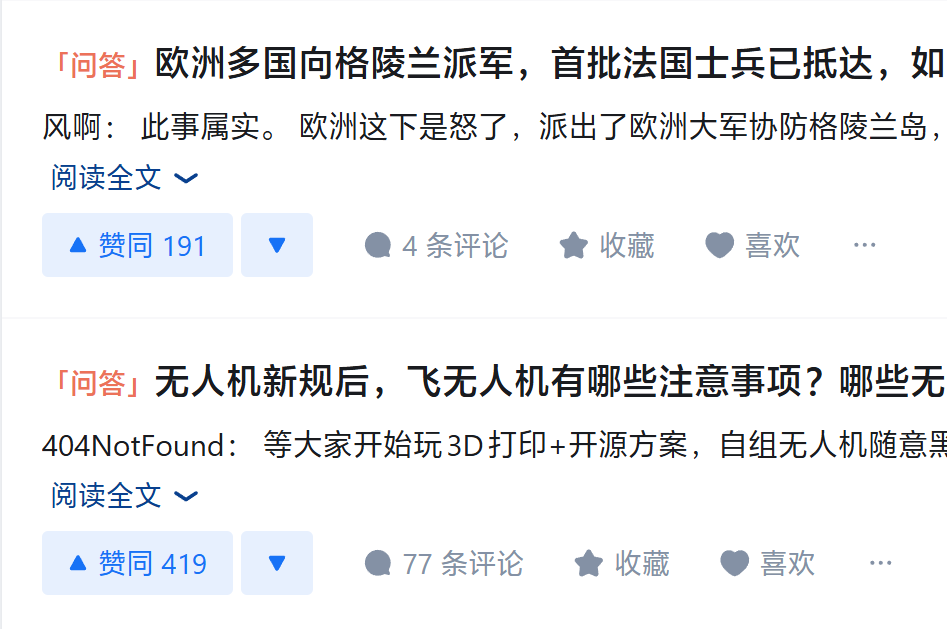
如图所示为脚本应用前后的网页变化。虽然图片经过压缩放大看起来不明显,但整体来看网页的清晰度确实明显提高了。

由于脚本是纯CSS逻辑,因此也可以被迁移到Stylus平台,理论上相对于油猴脚本的执行效率更高,但实测没什么区别,有可能是因为脚本优化的太好导致看不出什么差别来(
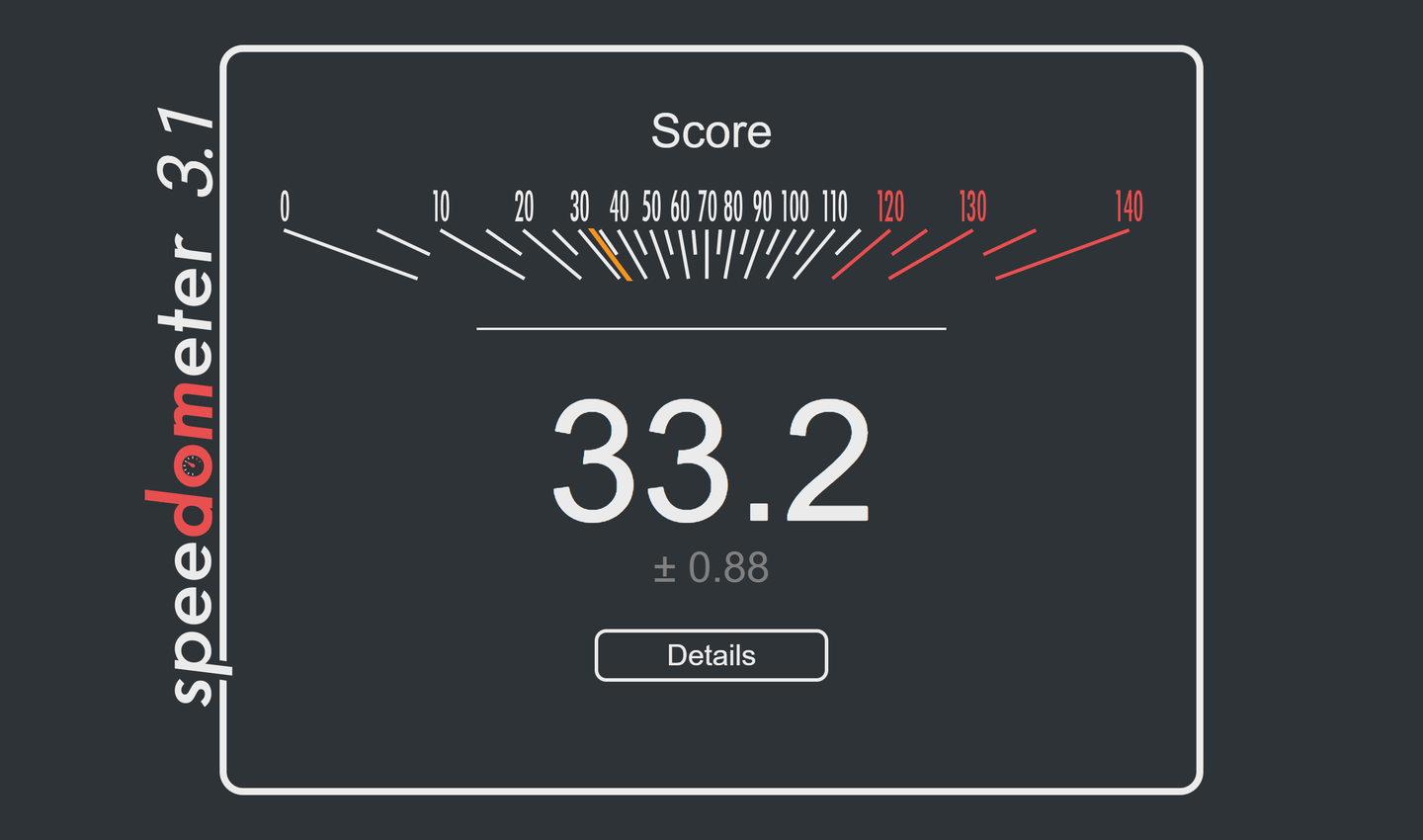
以笔者的测试平台为例,无其他扩展情况下Speedometer3.1的跑分约33。
打开暴力猴或者Stylus后加载字体渲染脚本,跑分均为30.5左右。
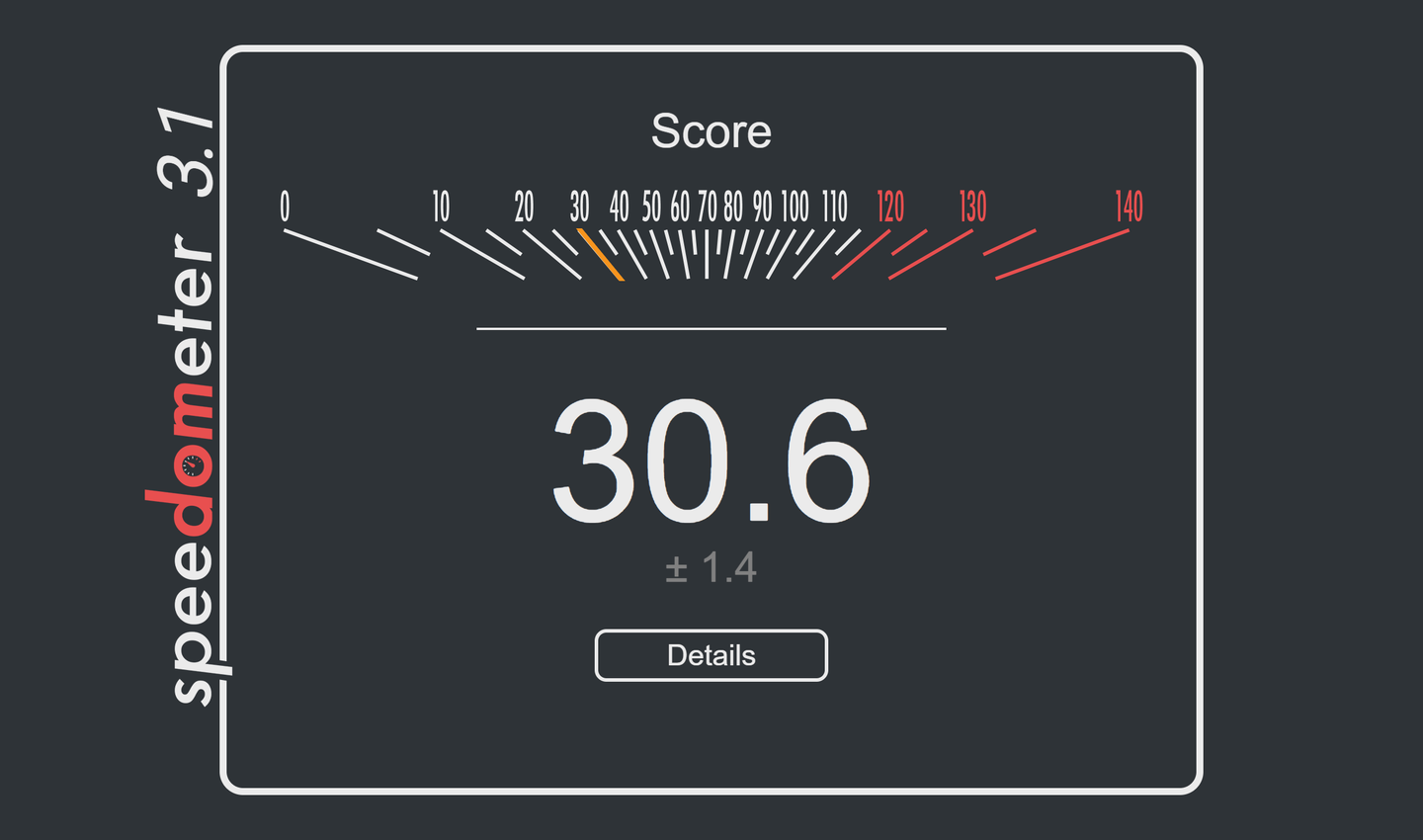
可以认为基本没有性能损耗。
Stylus样式代码如下。
/* ==UserStyle==
@name           字体渲染
@namespace      fontrenderning.css.cmos4k
@version        1.3.0
@description    解决Windows平台浏览器默认情况下字体渲染偏细的问题。
@author         太极
==/UserStyle== */

@-moz-document url-prefix("http://"), url-prefix("https://") {

    /* 1. 全局抗锯齿与渲染优化 */
    html {
        -webkit-font-smoothing: antialiased !important;
        -moz-osx-font-smoothing: grayscale !important;
        text-rendering: optimizeLegibility !important;
        -webkit-text-size-adjust: 100% !important;
    }

    /* 2. 核心渲染规则 */

    body, * {
        text-shadow: 0 0 0.75px #7C7C7CDD;
        -webkit-text-stroke: 0px transparent;
    }

    /* 3. 强制排除项 */
    i,
    [class*='glyph' i],
    [class*='symbols' i],
    [class*='icon' i],
    [class*='fa-' i],
    [class*='vjs-' i],
    [class*='watermark' i],
    mjx-container *,
    .katex *,
    .textLayer *,
    pre, pre *,
    code, code * {
        text-shadow: none !important;
        -webkit-text-stroke: 0px transparent !important;
    }

    /* 4. 选中样式修复 */
    ::selection {
        background: Highlight !important;
        color: HighlightText !important;
        text-shadow: none !important;
        -webkit-text-stroke: 0px transparent !important;
    }
}
相关网站
- 脚本地址(Greasy Fork)
编辑于 2026-01-16 · 著作权归作者所有